AI can generate polished prototypes in minutes, but its biggest impacts are not just in look and feel but on the design process itself and how teams collaborate and turn ideas into reality.


AI can generate polished prototypes in minutes, but its biggest impacts are not just in look and feel but on the design process itself and how teams collaborate and turn ideas into reality.
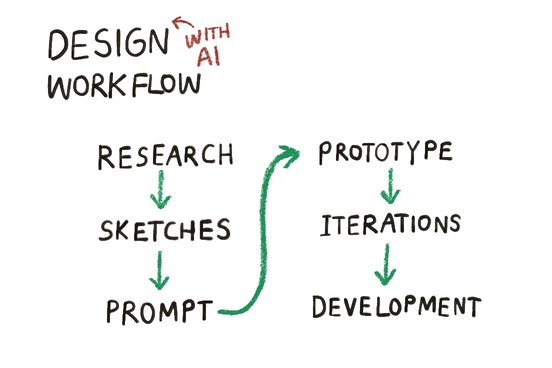
AI tools are becoming a common part of the design process. As a service designer and researcher working at Unboxed, a design and development agency, I’ve seen how AI can speed up activities that once took hours or days, from synthesising research insights to generating interactive prototypes. Some of the work involved in producing higher-fidelity prototypes can now be done in minutes, using tools like Claude Design and Google AI Studio.
Prototyping is a part of the design process. Creating prototypes with AI brings new challenges. AI can generate polished and convincing designs that look well thought-through at first glance, but that only work in the "happy path" and aren’t as capable as they look. It can also add features nobody asked for. These additions might look promising, but when their reasoning isn't clear, they create confusion later in development.
This experience led our team to a bigger question: if AI is changing how quickly we create prototypes, how should it change the way we design? We found that while we were undoubtedly able to speed up this part of the design process, the gains were partially offset by the gap it opened up between designers and developers and the way we collaborate.
A couple of months ago, using AI to build prototypes was still an experiment, something we needed to flag and discuss with clients upfront. Recently, it's become part of our normal design process.
We got a great opportunity to design and build a website and backend admin portal for a book-sharing programme that helps parents read with their child. We were brought in to design a journey for a specific user of the service (a facilitator), and the functionality to support it. Being curious with the new AI tools, I chose to prototype with AI on this project because of the tight timeline and a small budget for design time. I thought that the approach would help me to achieve the job in a short period of time.
Researching user needs across the service journey showed the brief was bigger than expected: it wasn't just about the facilitator's journey. To make the whole system work and to properly user test it, we also needed to design an admin portal and a family dashboard.
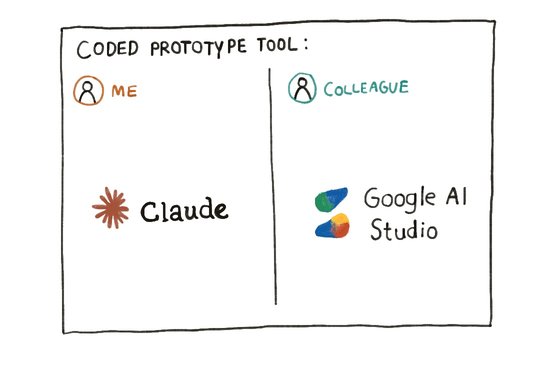
We split across different AI tools to create prototypes to demonstrate functionalities of the portal and the dashboard. Because of usage limits and the tool didn't support us working in the same file. I also saw this as an opportunity to experiment with a new tool, Claude Design, at the time, as I could see how it might help us to deliver within our client’s timeframe.
The work was split across two designers. While I focused on the admin and facilitator portals, my colleague designed the family dashboard, with regular collaboration to share our approach and ideas. Although our intention was to create prototypes as functional sketches, the AI-generated outputs looked highly polished and production-ready. As a result, both our client and our developer regarded them as final designs rather than exploratory prototypes. This created a number of challenges.
First, high-fidelity prototypes can create false confidence and unrealistic expectations. Because the designs looked complete, we found ourselves pre-empting decisions that had not yet been fully explored or validated. For example, our developer spent more time working out components, behaviours, and styles that we hadn’t clearly defined before sharing our prototypes - usually, we’d iterate these during the sketching and prototype development process to present a consistent approach, but the AI tools took some of that thinking away from us.
Second, AI frequently generated additional elements beyond what we had prompted. While some additions appeared useful, they often required further discussion and refinement because they had not been intentionally designed.
Third, collaboration became more difficult. Unlike traditional design tools, the AI tools we used did not support collaborative workflows (at the time we did the project). Working across different tools made it difficult to share and edit the same prototype, and the generated code was often inconsistent. While AI accelerated design production, it also introduced friction between design and development.
Finally, the speed of AI changed client expectations. Because design changes appeared quick and easy to produce, clients were more likely to request additional iterations, creating new pressures on project scope and timelines.
While collaboration between designers and developers was sometimes challenging, the project ultimately delivered value for the client. We quickly reflected on what wasn’t working and how we could collaborate across design and development to deliver what the client needed. The client was pleased with the outcome and now has a foundational backend system that supports the service in its early stages.
After recognising these challenges, the project team held a retrospective and shared our experiences with colleagues across Unboxed. We wanted to see whether others had hit the same issues and to shape a better way of working with AI going forward. Based on my own reflections, team discussions, and further research, here are what I learned about designing with AI and good practices moving forward:
The biggest challenge wasn't creating prototypes quickly; it was maintaining alignment between designers and developers. It's important to work with developers to establish a design system or style guide that can guide AI tools and developer implementation, rather than having to unpick something generated by AI. As AI becomes part of the workflow, collaboration and shared understanding become even more important.
AI can introduce features, content, and interactions that were never intentionally designed. Treat AI-generated elements as suggestions rather than decisions. Use your critical judgement and ask whether they solve the user's needs and improve user experience.
AI can produce polished interfaces making unfinished ideas appear more complete than they really are. This can influence both clients and project teams, creating assumptions that decisions have already been made or validated. Know how familiar your audience is with the design process, and set expectations accordingly. It is important to communicate clearly what a prototype is intended to show and what is still being explored.
AI can quickly create polished interfaces that look production-ready, even when important design decisions have not yet been tested. The design still requires research, testing, and critical thinking. In many ways, those skills became even more important because AI generated more possibilities than we could reasonably implement. Be clear about the problem you're trying to solve, sketch and explore multiple concepts before you start prompting.
I've learned most of this by doing, learning new tools through experimentation, and making a few mistakes along the way. I’ve developed a different perspective on designing with AI.
AI becomes a more natural part of our day-to-day work, and there's no avoiding that.
The real skill is in judgement; learning how to use it thoughtfully. It is our responsibility to decide when AI is useful, which tools are appropriate for a task, and where human judgement remains essential.
AI doesn't just change how quickly we create prototypes. It changes how teams collaborate and make decisions. Handled carelessly, that can widen a gap between design and development. Handled well, it's an opportunity to work more effectively together.
Technology may be evolving rapidly, but the fundamentals of good design remain the same: understanding the needs, solving the right problems, and using human judgement to make meaningful decisions.
At Unboxed, we are always happy to welcome new talent looking for work experience. If you are interested in service design or digital product development, send us an enquiry today.